Skip to content
Documentation for Themes
  • Home
  • Support
  • Theme Docs

Autrics

  • Autrics Shortcodes
  • ElementsKit Header Footer Builder
  • General information
  • Image Source
  • Introduction and quick start guide.
  • LICENSE ACTIVATION
  • Slug Change
  • Theme Customizer
  • Translation
  • Version History (Changelog)
  • Visual Page Builder

BasCart

  • Advanced Slider Editing
  • Bascart Multivendor Settings
  • Common Error
  • CSS Customization
  • General Information
  • Guide Size for global products
  • Header Footer Builder
  • Image Source
  • Instagram Feed
  • Introduction and quick start guide.
  • Optimization Settings
  • Remove Popup Modal
  • Support Desk
  • Theme Customizer
  • Variation Swatches Settings
  • Visual Page Builder
  • WooCommerce Lucky Wheel Settings
  • WooCommerce Products
  • WooCommerce with ShopEngine

Bizxpo

  • General Information
  • Introduction and quick start guide.
  • License
  • RTL Settings
  • Support Desk
  • Theme Customizer
  • Update required pro plugins
  • Visual Page Builder

BuildBench

  • CSS Customization
  • General Information
  • Introduction and quick start guide.
  • Slug Change
  • Support Desk
  • Theme Customizer
  • Version History (Changelog) 
  • Visual Page Builder

Cafesio

  • Cafesio Header Footer
  • General Information
  • Home Page Edit with Elementor
  • Introduction and quick start guide.
  • License
  • Multi-Vendor Settings
  • Optimization Settings
  • RTL Settings
  • Support Desk
  • Theme Settings
  • Update Required Pro Plugins
  • Visual Page Builder

Courselog

  • BuddyPress
  • Courselog Slug Change
  • Courselog Widgets
  • Courselog with Eventin
  • Courselog with WooCommarce
  • Elementskit Header/Footer Builder
  • General Information
  • How to use Courselog Theme with Tutor LMS
  • Instructor Profile
  • Introduction and Quick Start Guide
  • LearnPress LMS
  • Login, Register & Share
  • Support
  • Theme Customizer
  • Visual Page Builder
  • Zoom Module

Cuinare

  • Common Error
  • CSS Customization
  • General Information
  • Image Source
  • Introduction and quick start guide.
  • Support Desk
  • Theme Customizer
  • Updates
  • Visual Page Builder

Deliciko

  • Common Error
  • CSS Customization
  • General Information
  • Image Source
  • Introduction and quick start guide
  • Support Desk
  • Theme Customizer
  • Updates
  • Visual Page Builder

Digiqole

  • Codestar Framework Migration
  • Common Error
  • Covid-19 Plugin
  • CSS Customization
  • Facebook Video
  • General Information
  • Image Source
  • Introduction and quick start guide.
  • License Activation
  • Live Score Setup For Sports Niche
  • Optimization Settings
  • Support Desk
  • Theme Customizer
  • Visual Page Builder

Dineora

  • General Information
  • How to Customize Colors and Fonts in Dineora
  • How to Customize the banner
  • How to Customize the Header and Footer
  • How to Quick Start with Dineora
  • Support Desk

EventPlace

  • Common Error
  • Credits
  • CSS Customization
  • Event Management
  • General Information
  • Image Source
  • Introduction and quick start guide.
  • Multivendor Event
  • Support Desk
  • Theme Customizer
  • Updates
  • Visual Page Builder

Exhibz

  • Codestar Framework Migration
  • Common Error
  • Countdown Text Change
  • General Information
  • How to Quick Start with Exhibz
  • Icon Settings
  • License Activation
  • Optimizations Settings
  • Slug Change
  • Support Desk
  • Theme Customizer
  • Visual Page Builder
  • Eventin Events
    • Create Event
    • Event Location
    • Event Schedule
    • Event Single Page With ELEMENTOR
    • Event Speaker & Organizer
    • General Settings
    • Recurring Events
    • Zoom Module

General

  • Education Theme FAQ
  • Minimal requirements

Geobin

  • Credits
  • General information
  • Geobin Elementor Widgets
  • Introduction and quick start guide.
  • Services Slug changes
  • Theme Customizer
  • Visual Page Builder

Gloreya

  • Common Error
  • General Information
  • Introduction and quick start guide
  • Support Desk
  • Theme Customizer
  • Updates
  • Visual Page Builder

Induxo

  • Common Error
  • General Information
  • Introduction and quick start guide
  • Support Desk
  • Theme Customizer
  • Updates
  • Visual Page Builder

Instive

  • CodeStar Migration
  • CSS Customization
  • General Information
  • Home 7
  • Image Source
  • Instive License Activation
  • Introduction and quick start guide
  • Services
  • Slug Change
  • Support Desk
  • Theme Customizer
  • Version History (Changelog)
  • Visual Page Builder

Inzox

  • Common Error
  • General Information
  • Introduction and quick start guide
  • Support Desk
  • Theme Customizer
  • Updates
  • Visual Page Builder

News247

  • Common Error
  • General Information
  • Introduction and quick start guide
  • Support Desk
  • Updates
  • Visual Page Builder

Newseqo

  • General Information
  • Introduction and quick start guide.
  • License
  • Newseqo Header & Footer(Free)
  • Newseqo Header & Footer(Pro)
  • Newseqo Widgets
  • Support Desk
  • Theme Customizer
  • Visual Page Builder

Privsa

  • CSS Customization
  • General Information
  • Image Source
  • Introduction and quick start guide
  • License Activation
  • Slug Change
  • Support Desk
  • Theme Customizer
  • Version History (Changelog)
  • Visual Page Builder

Qoxag

  • AMP Settings
  • Common Error
  • CSS Customization
  • Dark Mode Support
  • Facebook Video
  • General Information
  • Gutenberg PostX
  • Image Source
  • Instagram Feed
  • Introduction and quick start guide.
  • Live Score Setup For Sports Niche
  • Optimization Settings
  • Popup Modal Settings
  • RTL Support
  • Support Desk
  • Theme Customizer
  • Visual Page Builder
  • WooCommerce Products
  • WooCommerce Support

Turitor

  • Common Error
  • Create Event
  • Create Instructor
  • CSS Customization
  • General Information
  • Image Source 
  • Introduction and quick start guide.
  • Learndash LMS
  • Learnpress LMS
  • License Activation
  • Slug Change
  • Support Desk
  • Theme Customizer
  • Tutor LMS
  • Version History (Changelog) 
  • Visual Page Builder
  • Zoom Settings

Tymic

  • Displaying Google Map
  • General Information
  • How to customize Header & Footer
  • How to Import Demo Data
  • Introduction and Quick Start Guide
  • Setting Up an Appointment Schedule
  • Support Desk
View Categories
  • Home
  • Docs
  • Courselog
  • LearnPress LMS

LearnPress LMS

LearnPress Settings: Create and Manage Courses #

Adding Learnpress to your WordPress Website

Before you start creating awesome courses with our plugin (which is fully compatible with LearnPress), you’d want to add it to your WordPress site. 

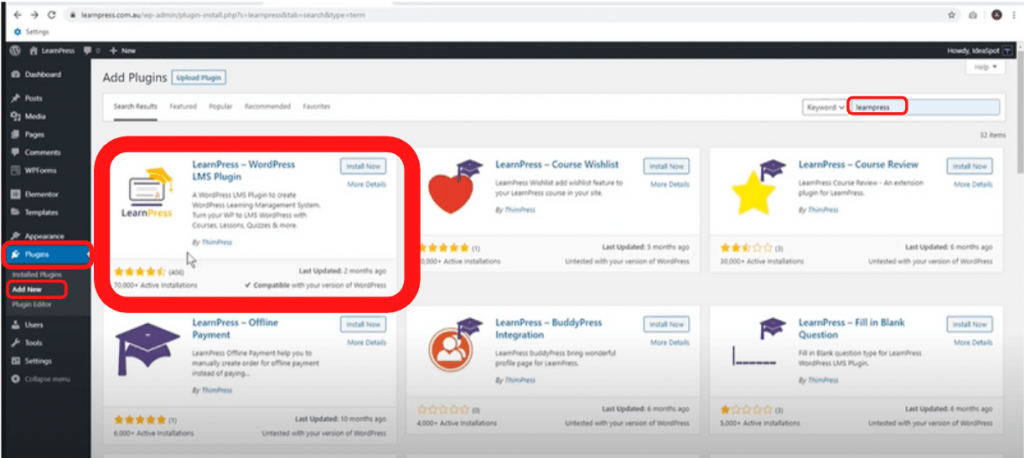
  1. First of all, choose ‘Plugins’ from your WordPress Dashboard. 
  2. Under that, you will find ‘Add New’. Click on it. 
  3. Then you will be taken to the Add Plugins page. 
  4. On the right-hand side, type ‘LearnPress’ 
  5. You should see it pop up as the very first (please consult the above image for help). 
  6. Press the ‘Install Now’ Button. 
Adding LearnPress Plugin

Once you press the install button, LearnPress will start the installation process. Once the plugin is installed. 

Click on the ‘Activate Button’ 
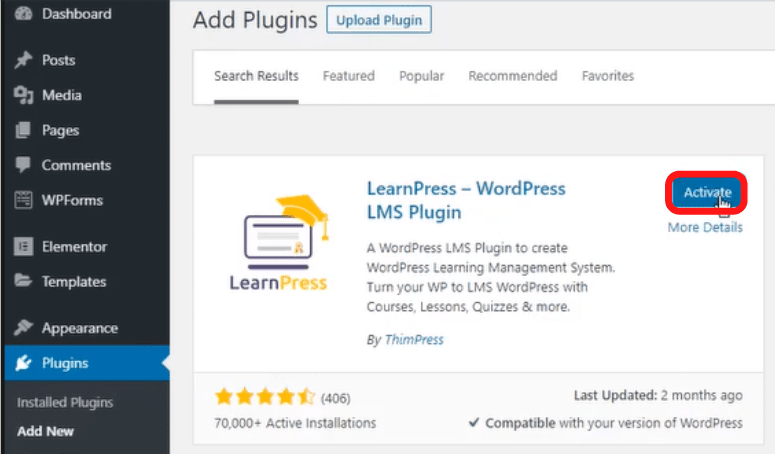
Activating the Plugin

You now have LearnPress installed on your WordPress site. You should now see the setup wizard:
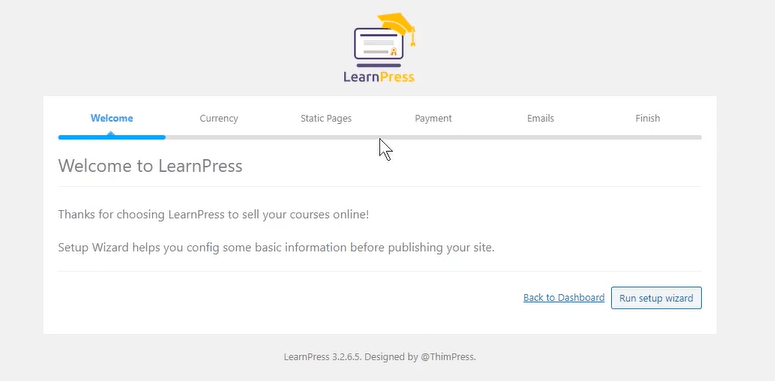
LearnPress Setup-wizard

You can choose to run the setup or skip it as per your wish. 

Create A Course with LearnPress  #

Step 1: Create your First Lesson  #

In order to create your first lesson: 

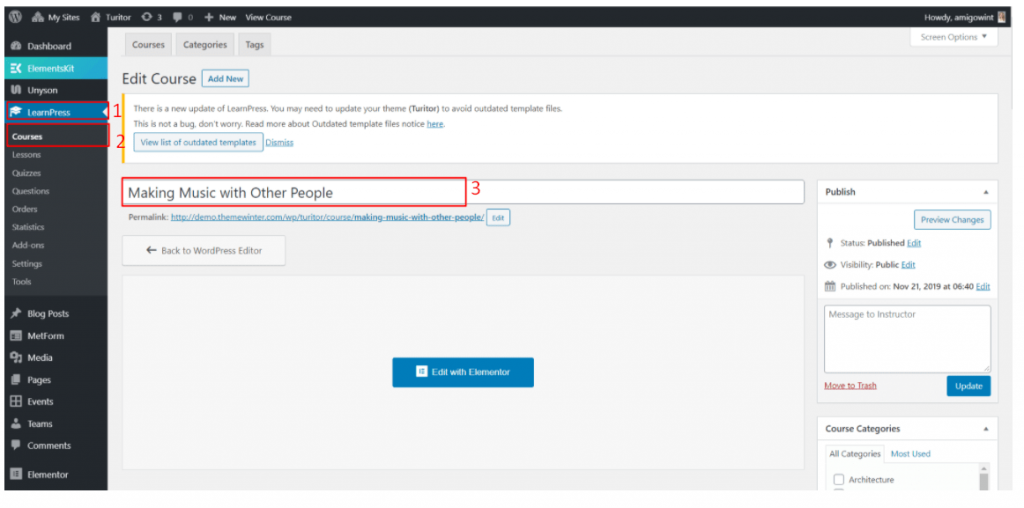
  1. Choose ‘LearnPress’ on your WordPress dashboard. 
  2. After that, go to ‘Courses’. 
  3. You are now in the ‘Edit Course’ where you can play with the options. 
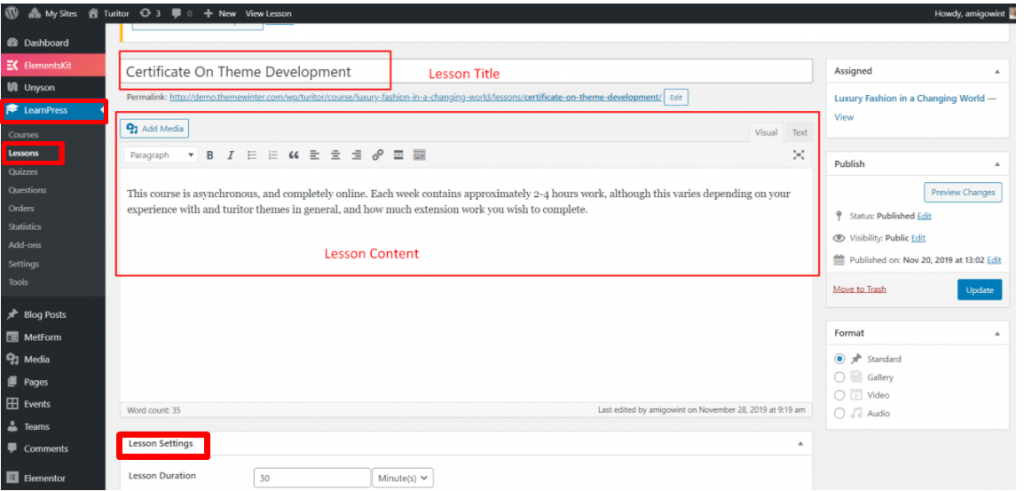
Creating a Lesson with LearnPress
  1. Add a lesson Title 
  2. Add some Content for your course. 

Step 2: Set the Lesson Settings  #

Under the ‘Lesson Settings’ tab, you will be able to: 
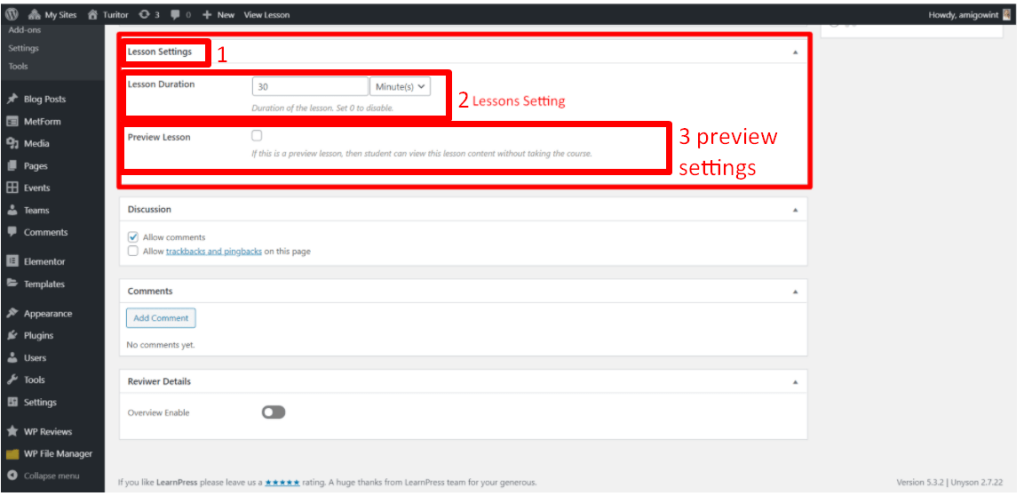
Lesson settings
Lesson settings
  1. Set the ‘Lesson’ duration. 
  2. Choose if you want to preview the lesson. 

You can create courses in a similar manner. In the next section, we will talk about how to work with the LearnPress Course Settings.

Editing a Course with LearnPress  #

We have already seen how to create a course. Now, if you want to edit a course with LearnPress: 

  1. Choose ‘LearnPress’. 
  2. After that, go to ‘Courses’. 

Here you have the option to: 

  1. Add New Course 
  2. Publish, maintain categories, and more. 

Curriculum Settings: Working with the ‘Curriculum Tab’  #

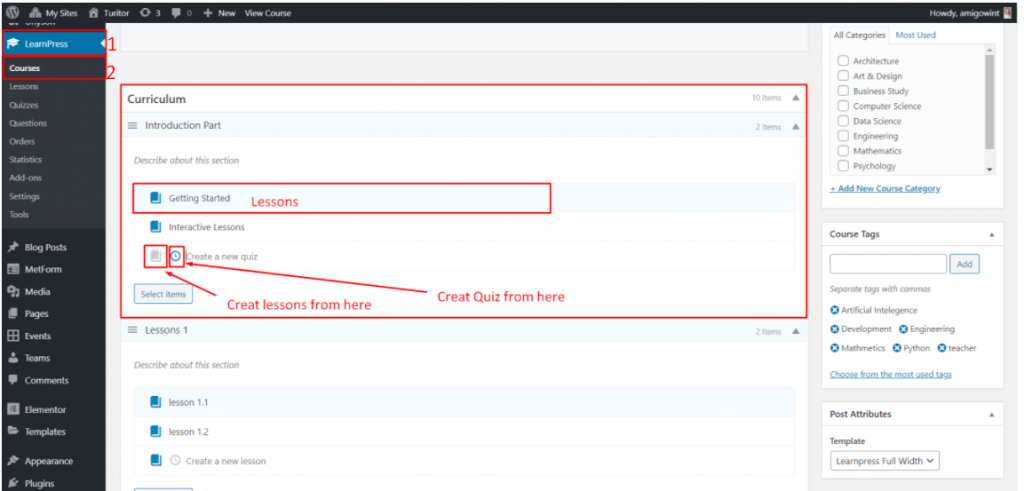
The ‘Curriculum’ tab will be under the ‘Courses’ Tab.  

  1. Choose ‘LearnPress’. 
  2. After that, go to ‘Courses’.
The Curriculum Tab
The Curriculum Tab

In the ‘Curriculum Tab’ you will find the following options: 

  • The ‘Getting Started’ Tab will allow you to set lessons for your course. 
  • You will be able to create quizzes from the ‘Create a new quiz’ tab. 

Managing the ‘Course Settings’  #

Inside the ‘Course Settings,’ you can set the course duration, manage the number of students, enable retake options and play with many other settings. 
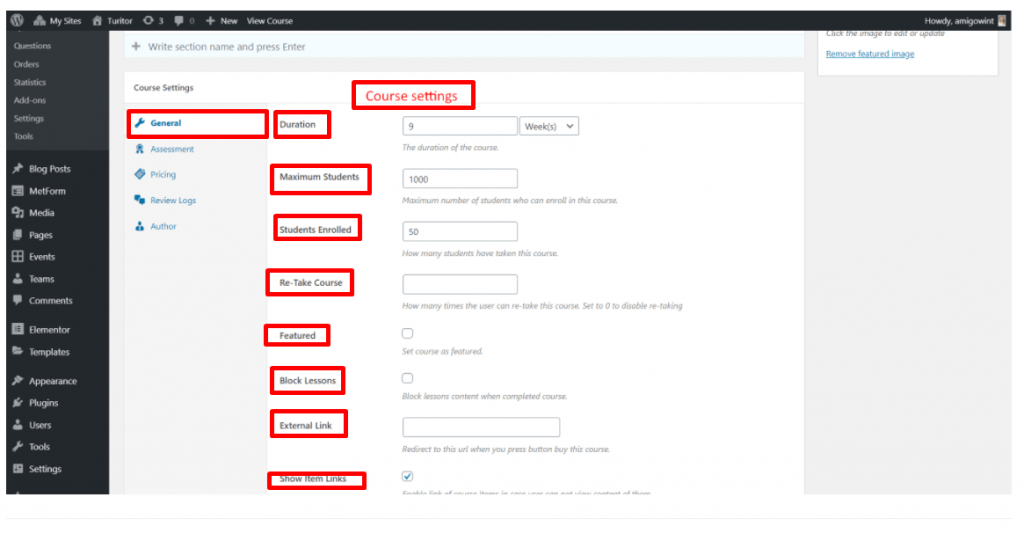
The Course Settings
The Course Settings

From the Course Settings, you will be able to set your :

  1. Trending Title and subtitle. 
  2. Trending courses according to popularity. 
  3. The course limit. 
  4. Slider show and many more.

Working with the Layout  #

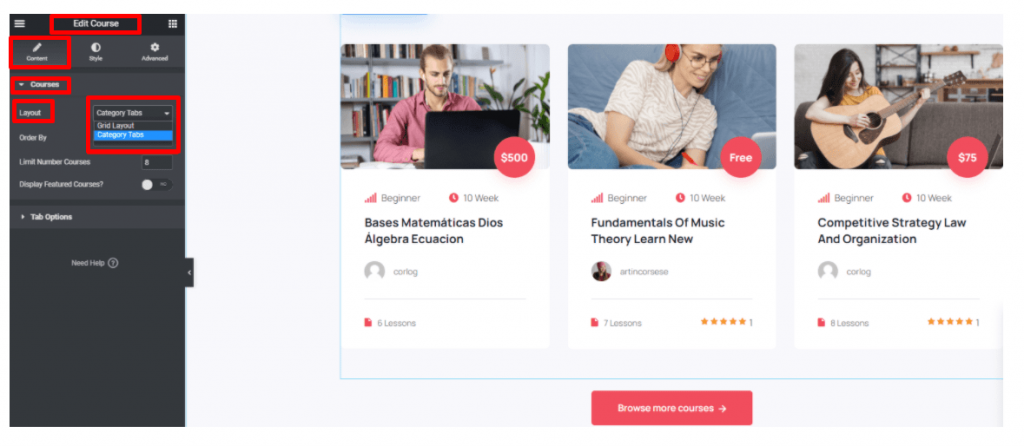
From the ‘Edit Courses’ tab, you can choose to ‘Edit with Elementor’. 

  1. Make sure you are on the ‘Edit Course’ pane. 
  2. Locate ‘Navigate’ 
Layout Options
Layout Options

You can choose from two options: 

  1. Grid layout 
  2. Category Tabs  

You have the liberty to showcase your courses however you please.

Course Wishlist  #

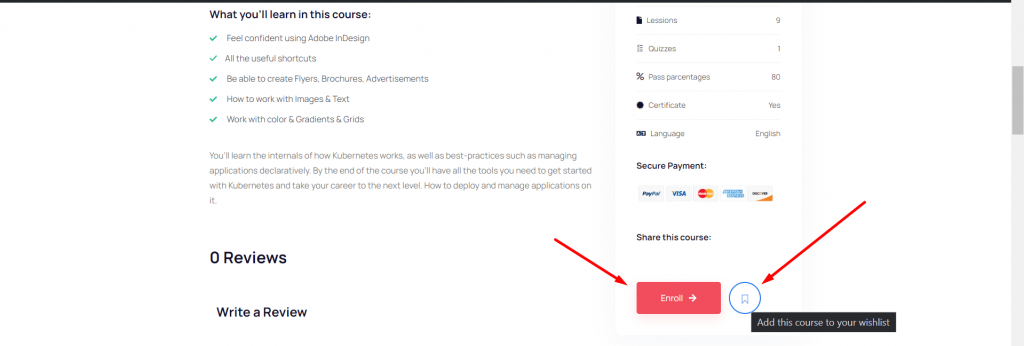
Our theme supports the LearnPress Wishlist Plugin. You can activate it by:

  1. Going to Plugins 
  2. Search for the  LearnPress Wishlist Plugin
  3. Activate it. 

Once you activate it, your sellable courses will have the ‘Add to Wishlist’ button. 
Setting quizzes for your course  #

Instructors can set quizzes using LearnPress. Students can access these quizzes under the materials of the courses they are taking. You can set quizzes in the following way: 

  1. Go to ‘LearnPress’ 
  2. Choose ‘Quizzes’

Once you choose it, it will show you a list of the Quizzes you already have. If you don’t have any quizzes uploaded, then you can choose ‘Add New’. 
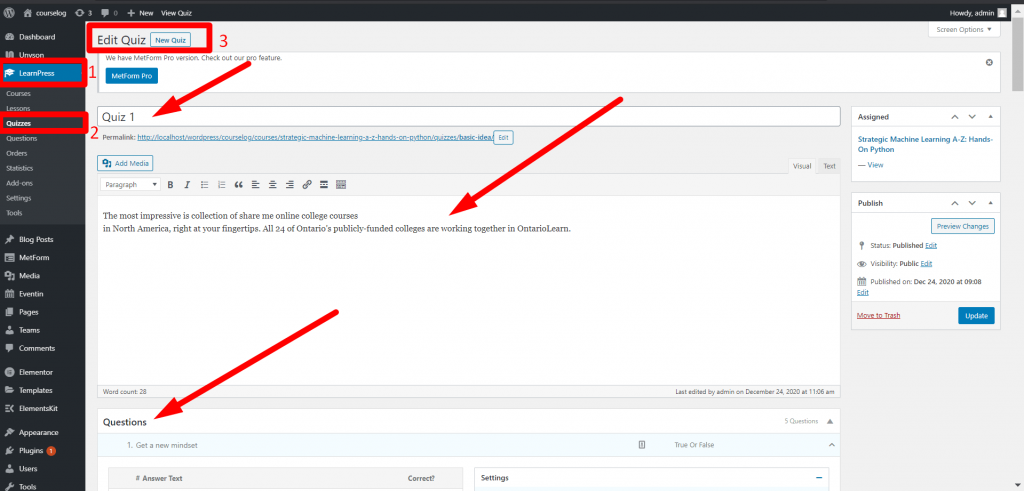
Quizzes Page
Quizzes Page

You can now add quizzes to your courses.  

Also, you can add questions individually. 

Assigning an Instructor  #

With the Courselog theme, you will be able to create instructors for your courses easily. 

  1. First of all, go to ‘Users’ on your WordPress Dashboard. 
  2. In the Username box, you can add a username. 
  3. Find the ‘Role’ tab. From here, you can assign the role of the instructor. 
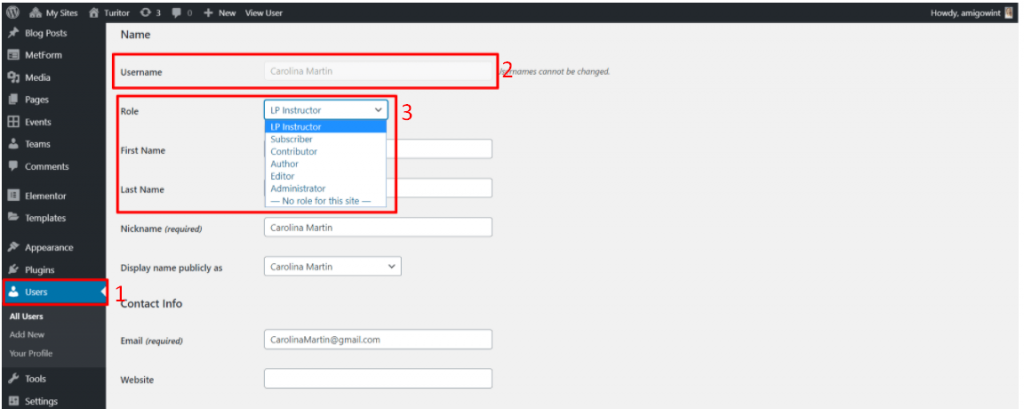
Instructor Assigning

From the ‘Role’ tab you can assign the instructor role with ease. 

Instructor Showcasing   #

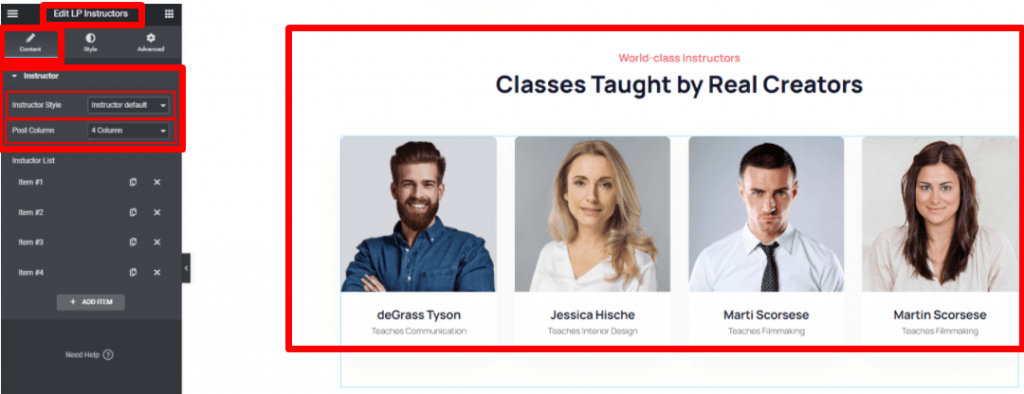
You can also edit the style of how the instructors are shown from the LP Instructors pane with Courselog. 
Course SetupHere is a short video about the process of creating course using LearnPress LMS including the other settings.

Learnpress Payment method #

In Learnpress, there has PaPal Payment method by default. For enabling the checkout page, Navigate to Dashboard> Learnpress> Settings> General and select Learnpress checkout page> Save changes.
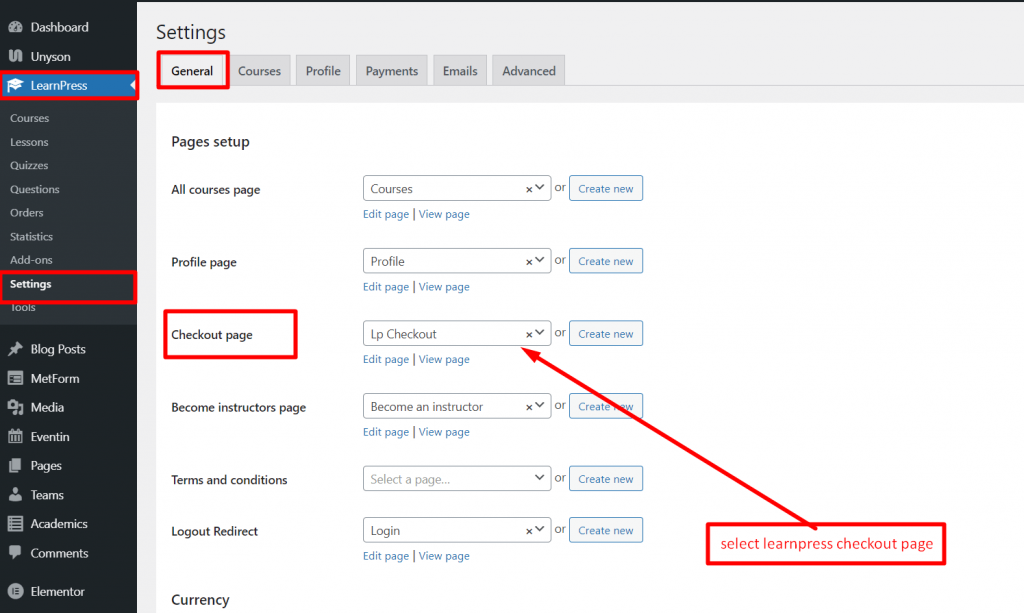
Learnpress don’t support WooCommerce directly. If you want to use WooCommerce payment getway in Learnpress, you need to use Learnpress WooCommerce Payment Getway Add-ons.

Here is the link for Learnpress WooCommerce Payment Getway Add-ons:

Add-ons link

What are your Feelings

Share This Article :

  • Facebook
  • X
  • LinkedIn
  • Pinterest
Updated on August 1, 2021
Introduction and Quick Start GuideLogin, Register & Share

Powered by BetterDocs

Table of Contents
  • LearnPress Settings: Create and Manage Courses
  • Create A Course with LearnPress 
    • Step 1: Create your First Lesson 
    • Step 2: Set the Lesson Settings 
    • Editing a Course with LearnPress 
    • Curriculum Settings: Working with the ‘Curriculum Tab’ 
    • Managing the ‘Course Settings’ 
    • Working with the Layout 
    • Course Wishlist 
  • Setting quizzes for your course 
  • Assigning an Instructor 
  • Instructor Showcasing  
  • Learnpress Payment method
Copyright © 2026 Documentations for Themewinter WordPress Themes.