Skip to content
Documentation for Themes
  • Home
  • Support
  • Theme Docs

Autrics

  • Autrics Shortcodes
  • ElementsKit Header Footer Builder
  • General information
  • Image Source
  • Introduction and quick start guide.
  • LICENSE ACTIVATION
  • Slug Change
  • Theme Customizer
  • Translation
  • Version History (Changelog)
  • Visual Page Builder

BasCart

  • Advanced Slider Editing
  • Bascart Multivendor Settings
  • Common Error
  • CSS Customization
  • General Information
  • Guide Size for global products
  • Header Footer Builder
  • Image Source
  • Instagram Feed
  • Introduction and quick start guide.
  • Optimization Settings
  • Remove Popup Modal
  • Support Desk
  • Theme Customizer
  • Variation Swatches Settings
  • Visual Page Builder
  • WooCommerce Lucky Wheel Settings
  • WooCommerce Products
  • WooCommerce with ShopEngine

Bizxpo

  • General Information
  • Introduction and quick start guide.
  • License
  • RTL Settings
  • Support Desk
  • Theme Customizer
  • Update required pro plugins
  • Visual Page Builder

BuildBench

  • CSS Customization
  • General Information
  • Introduction and quick start guide.
  • Slug Change
  • Support Desk
  • Theme Customizer
  • Version History (Changelog) 
  • Visual Page Builder

Cafesio

  • Cafesio Header Footer
  • General Information
  • Home Page Edit with Elementor
  • Introduction and quick start guide.
  • License
  • Multi-Vendor Settings
  • Optimization Settings
  • RTL Settings
  • Support Desk
  • Theme Settings
  • Update Required Pro Plugins
  • Visual Page Builder

Courselog

  • BuddyPress
  • Courselog Slug Change
  • Courselog Widgets
  • Courselog with Eventin
  • Courselog with WooCommarce
  • Elementskit Header/Footer Builder
  • General Information
  • How to use Courselog Theme with Tutor LMS
  • Instructor Profile
  • Introduction and Quick Start Guide
  • LearnPress LMS
  • Login, Register & Share
  • Support
  • Theme Customizer
  • Visual Page Builder
  • Zoom Module

Cuinare

  • Common Error
  • CSS Customization
  • General Information
  • Image Source
  • Introduction and quick start guide.
  • Support Desk
  • Theme Customizer
  • Updates
  • Visual Page Builder

Deliciko

  • Common Error
  • CSS Customization
  • General Information
  • Image Source
  • Introduction and quick start guide
  • Support Desk
  • Theme Customizer
  • Updates
  • Visual Page Builder

Digiqole

  • Codestar Framework Migration
  • Common Error
  • Covid-19 Plugin
  • CSS Customization
  • Facebook Video
  • General Information
  • Image Source
  • Introduction and quick start guide.
  • License Activation
  • Live Score Setup For Sports Niche
  • Optimization Settings
  • Support Desk
  • Theme Customizer
  • Visual Page Builder

Dineora

  • General Information
  • How to Customize Colors and Fonts in Dineora
  • How to Customize the banner
  • How to Customize the Header and Footer
  • How to Quick Start with Dineora
  • Support Desk

EventPlace

  • Common Error
  • Credits
  • CSS Customization
  • Event Management
  • General Information
  • Image Source
  • Introduction and quick start guide.
  • Multivendor Event
  • Support Desk
  • Theme Customizer
  • Updates
  • Visual Page Builder

Exhibz

  • Codestar Framework Migration
  • Common Error
  • Countdown Text Change
  • General Information
  • How to Quick Start with Exhibz
  • Icon Settings
  • License Activation
  • Optimizations Settings
  • Slug Change
  • Support Desk
  • Theme Customizer
  • Visual Page Builder
  • Eventin Events
    • Create Event
    • Event Location
    • Event Schedule
    • Event Single Page With ELEMENTOR
    • Event Speaker & Organizer
    • General Settings
    • Recurring Events
    • Zoom Module

General

  • Education Theme FAQ
  • Minimal requirements

Geobin

  • Credits
  • General information
  • Geobin Elementor Widgets
  • Introduction and quick start guide.
  • Services Slug changes
  • Theme Customizer
  • Visual Page Builder

Gloreya

  • Common Error
  • General Information
  • Introduction and quick start guide
  • Support Desk
  • Theme Customizer
  • Updates
  • Visual Page Builder

Healnetic

  • Header/ Footer Settings
  • How to Add Doctors in Healnetic
  • How to Add Services in Helanetic
  • Import Demo Data
  • Install  Theme and Plugins 
  • Quick Setup Guide
  • Support Desk
  • Theme Options Settings
  • Theme Update Guide
  • Welcome to Healnetic

Induxo

  • Common Error
  • General Information
  • Introduction and quick start guide
  • Support Desk
  • Theme Customizer
  • Updates
  • Visual Page Builder

Instive

  • CodeStar Migration
  • CSS Customization
  • General Information
  • Home 7
  • Image Source
  • Instive License Activation
  • Introduction and quick start guide
  • Services
  • Slug Change
  • Support Desk
  • Theme Customizer
  • Version History (Changelog)
  • Visual Page Builder

Inzox

  • Common Error
  • General Information
  • Introduction and quick start guide
  • Support Desk
  • Theme Customizer
  • Updates
  • Visual Page Builder

News247

  • Common Error
  • General Information
  • Introduction and quick start guide
  • Support Desk
  • Updates
  • Visual Page Builder

Newseqo

  • General Information
  • Introduction and quick start guide.
  • License
  • Newseqo Header & Footer(Free)
  • Newseqo Header & Footer(Pro)
  • Newseqo Widgets
  • Support Desk
  • Theme Customizer
  • Visual Page Builder

Privsa

  • CSS Customization
  • General Information
  • Image Source
  • Introduction and quick start guide
  • License Activation
  • Slug Change
  • Support Desk
  • Theme Customizer
  • Version History (Changelog)
  • Visual Page Builder

Qoxag

  • AMP Settings
  • Common Error
  • CSS Customization
  • Dark Mode Support
  • Facebook Video
  • General Information
  • Gutenberg PostX
  • Image Source
  • Instagram Feed
  • Introduction and quick start guide.
  • Live Score Setup For Sports Niche
  • Optimization Settings
  • Popup Modal Settings
  • RTL Support
  • Support Desk
  • Theme Customizer
  • Visual Page Builder
  • WooCommerce Products
  • WooCommerce Support

Turitor

  • Common Error
  • Create Event
  • Create Instructor
  • CSS Customization
  • General Information
  • Image Source 
  • Introduction and quick start guide.
  • Learndash LMS
  • Learnpress LMS
  • License Activation
  • Slug Change
  • Support Desk
  • Theme Customizer
  • Tutor LMS
  • Version History (Changelog) 
  • Visual Page Builder
  • Zoom Settings

Tymic

  • Displaying Google Map
  • General Information
  • How to customize Header & Footer
  • How to Import Demo Data
  • Introduction and Quick Start Guide
  • Setting Up an Appointment Schedule
  • Support Desk
View Categories
  • Home
  • Docs
  • Healnetic
  • Import Demo Data

Import Demo Data

You can quickly set up your website to look exactly like the demo using either the One-Click Demo Import or Manual Import method.

One-Click Demo Import #

This is the easiest and fastest way to set up your site like the demo.

⚠️ Important: Use this method only on a fresh WordPress installation. It is not recommended for sites that already contain content.

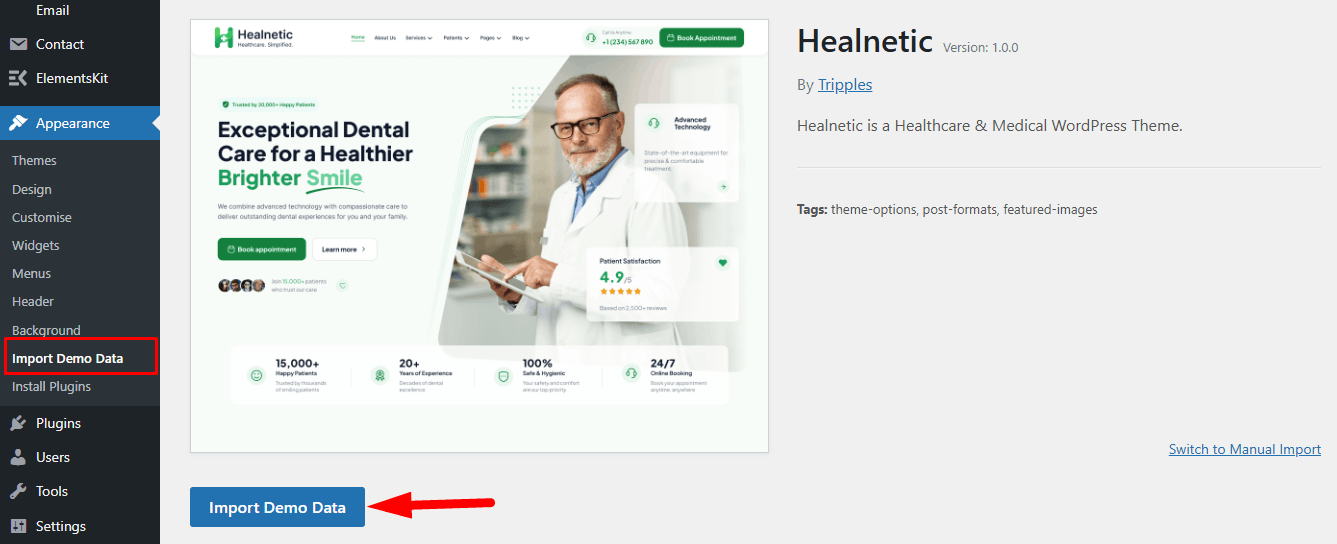
  • Go to Appearance → Import Demo Data
  • Select the demo layout that best matches your website
  • Click Import Demo Content
  • Wait for the process to complete

This will automatically import:

  • Pages and layouts
  • Menus and navigation
  • Theme settings
  • Widgets and homepage content

After import, your site will look exactly like the demo preview.
Manual Demo Import #

If your website already contains content, we recommend using manual import to avoid overwriting existing data.

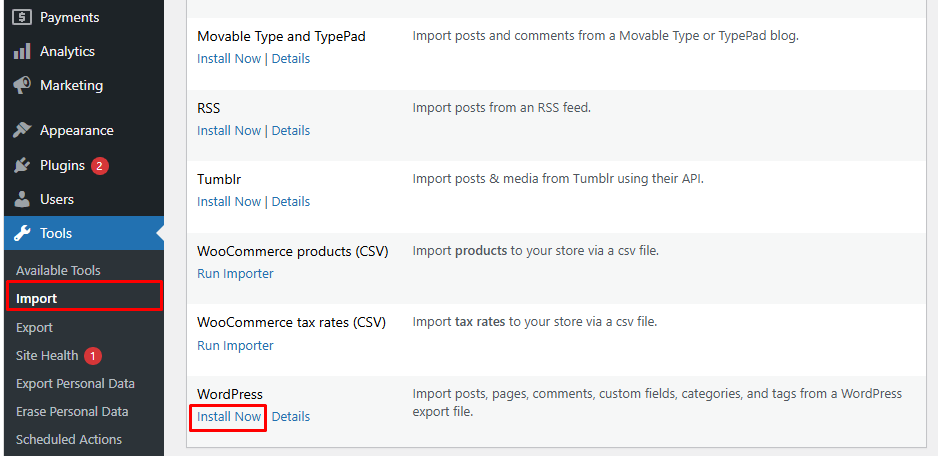
  • Go to Tools → Import in your WordPress dashboard
  • Select the WordPress Importer tool
  • Upload the XML file provided in the theme package
  • Assign content to a user or create a new user
  • Click Run Importer

This method allows you to import demo content safely without affecting existing pages or posts.
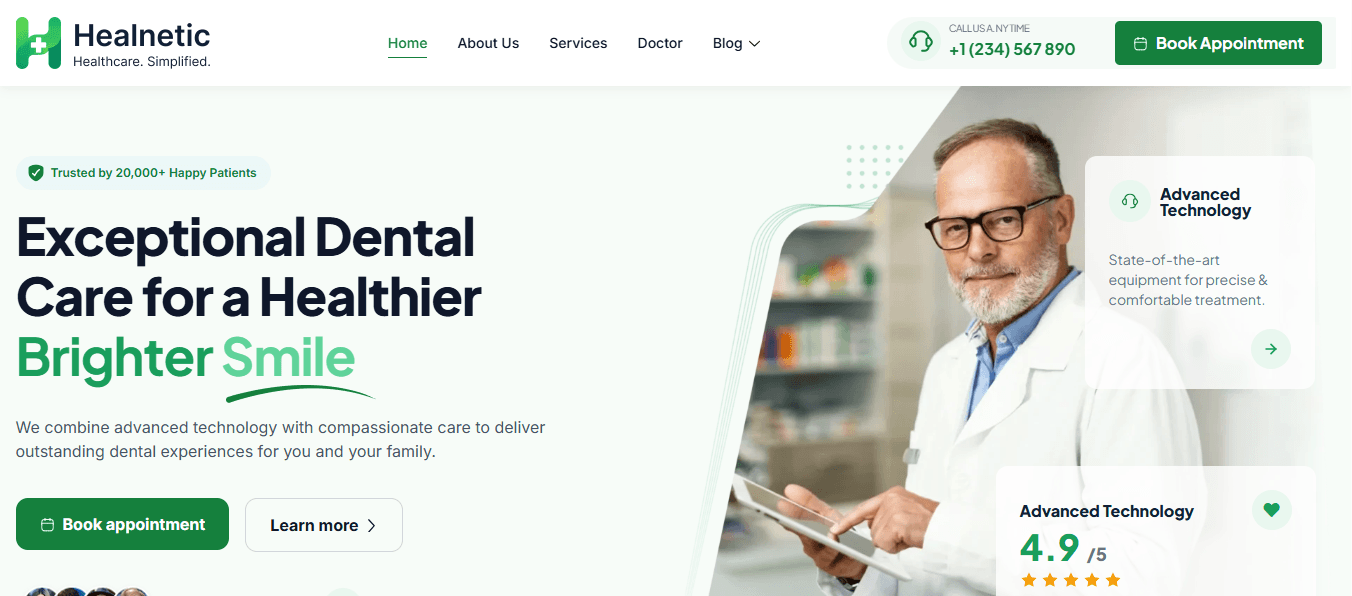
After installing the demo, your website will look similar to the demo preview shown below.
What are your Feelings

Share This Article :

  • Facebook
  • X
  • LinkedIn
  • Pinterest
Updated on May 19, 2026
How to Add Services in HelaneticInstall  Theme and Plugins 

Powered by BetterDocs

Table of Contents
  • One-Click Demo Import
  • Manual Demo Import
Copyright © 2026 Documentations for Themewinter WordPress Themes.