
The Version Control feature in WP Cafe allows you to safely revert to any previous plugin version. This is especially useful if you encounter issues after an update or need to use an older version to resolve conflicts with your theme or other plugins.
What Version Control Does #
- Displays a list of all previously released WP Cafe versions.
- Enables selecting any version and reinstalling it with one click.
- Helps quickly resolve theme/plugin conflicts or update-related issues
Using Version Control (Free Version) #
Follow these steps to revert WP Café to a previous free version:
- Go to WP Admin → WP Cafe → Settings → Version Control.
- Select a previous version from the Rollback Version dropdown.
- Click Reinstall to downgrade the plugin to the selected version.
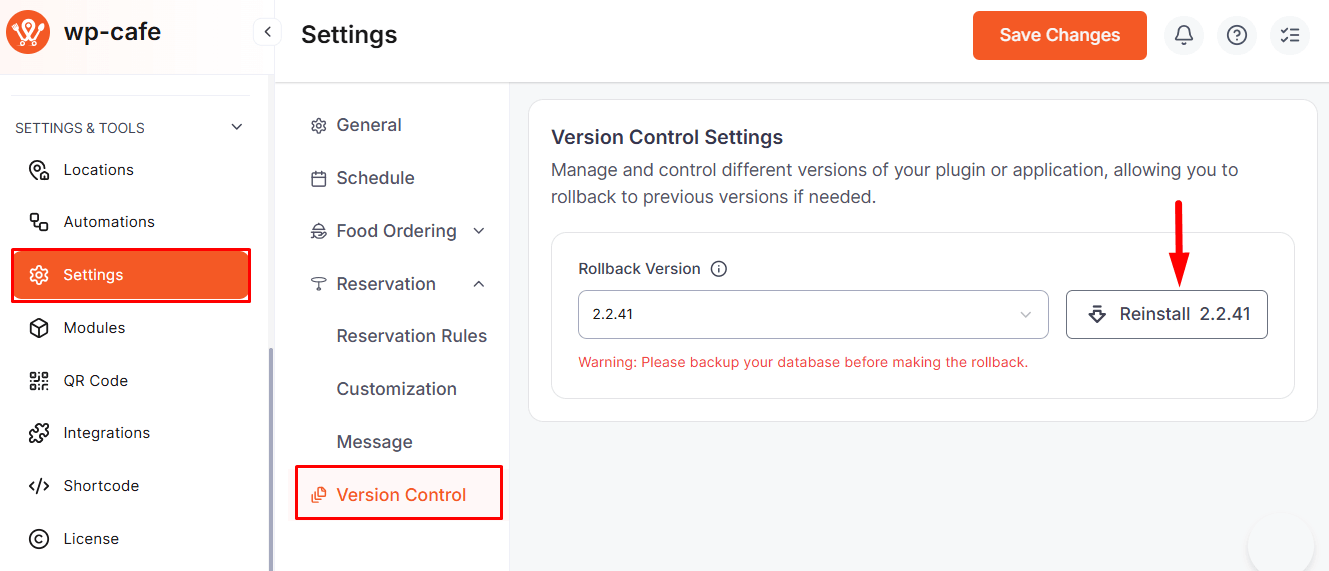
Always take a full site backup before performing a rollback. Rolling back may affect certain settings or database structures, so a backup ensures safety.
Downgrading WP Cafe Pro #
To revert WP Cafe Pro to an older version:
- Log in to your ThemeWinter Account.
- Navigate to your Purchase History section.
- Locate the version you want to download.
- Download the older version and install it on your site by replacing the current plugin.


